
Coming soon · Early access is open
Monte Carlo simulation in the Excel workbooks that you already use
Probistica is an add-in for 64-bit Excel for Windows. Put distributions in cells, run thousands of trials, and see the range of results, the chance of each outcome, and the inputs that drive them.
Probistica is not released yet. Join by e-mail. When the signed release is ready, you get the software and a free 15-day trial with all features. You send no payment data and no machine ID.
One add-in, from the model to the report
Each feature works in your workbook. Your model stays a normal Excel workbook.
Simulation and distributions
Put more than 50 distribution functions in cells. Add correlations and copulas. Run with Monte Carlo or Latin Hypercube sampling.
Distribution fitting
Fit distributions to your data. Probistica ranks the families and writes the formula of the fit that you choose.
Sensitivity and charts
See histograms, tornado, spider, scatter, and convergence charts. Find the inputs that drive each output.
What-If, stress, and Goal Seek
Change inputs step by step. Stress the tails. Find the input value that gives a target statistic.
Optimization under uncertainty
Search for decision values that improve a statistic of an output, with hard and soft constraints.
Time series
Fit 13 time-series models to a data series and simulate forecast paths in the workbook.
Automation and VBA
Run models from VBA, run your own macros during a simulation, and control Probistica from .NET code.
Reports and BI export
Write reports to sheets or PDF. Export samples and statistics to CSV files or a SQLite file for a BI tool.
Start with one of the 20 example models. Each one has numbered steps on the sheet.
Results
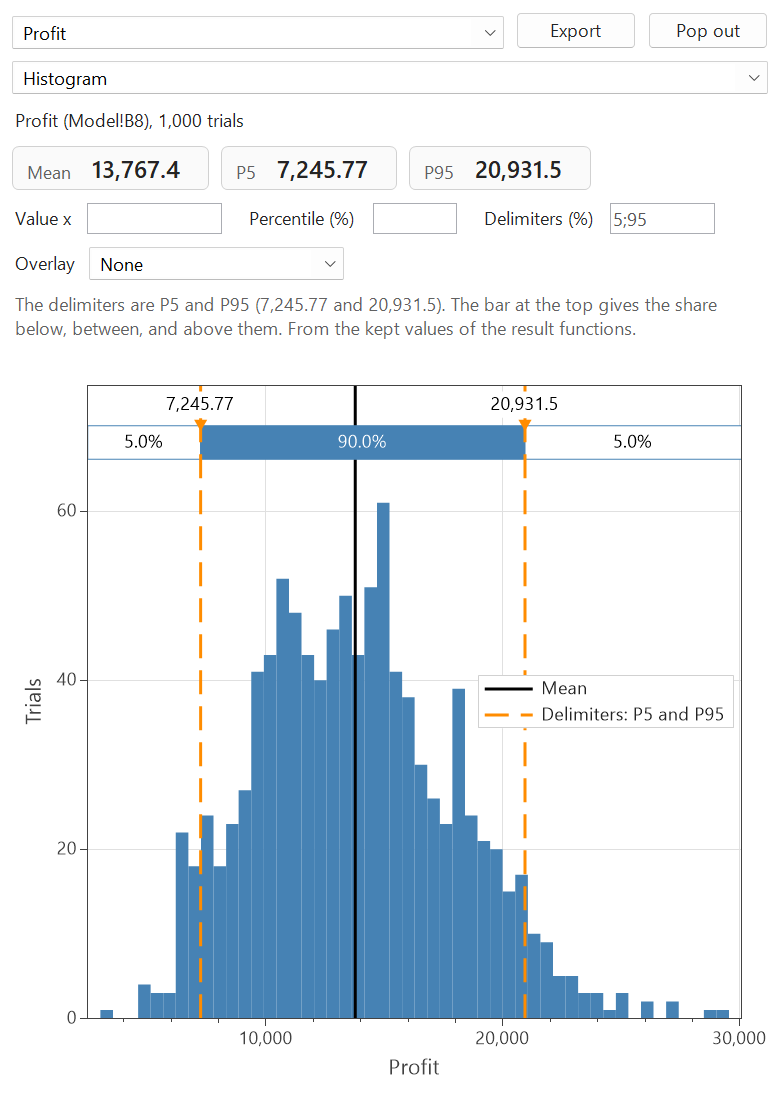
See the range, not only one number
A single estimate hides the risk. Probistica runs your model for many trials and shows the full distribution of each output.
- The mean, the percentiles, and the chance of a value above or below a limit.
- Delimiters show the share of the trials between two values.
- Pop out a chart to its own window, or export it.
Sensitivity
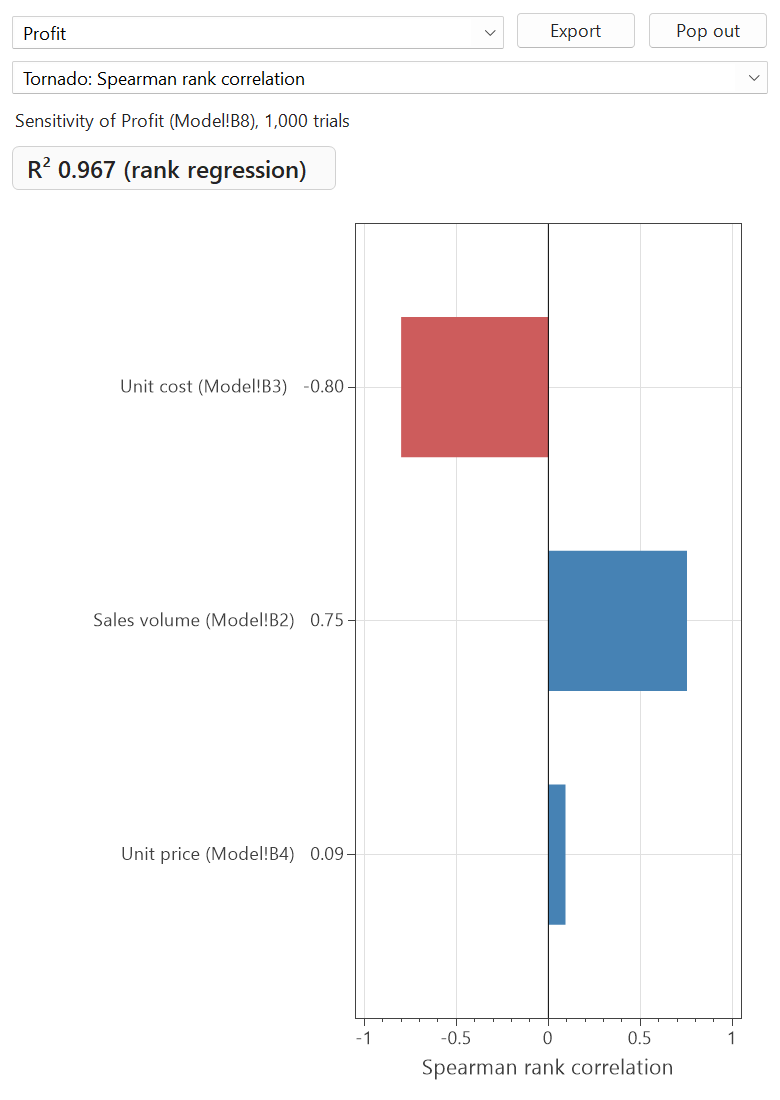
Find the inputs that drive the result
Probistica measures how much each input moves each output. The tornado chart sorts the inputs by their effect.
- Rank correlation, rank regression, and stepwise regression.
- Contribution to variance and the change of the output by input bin.
- Scenario analysis: which inputs are high or low when the output is in its top 10%.
How early access and the free trial work
Early access: Probistica is not released yet. We send the first trial e-mails when the signed release is ready. Join the list now. We reply within 2 business days to confirm your request with the latest release status, and we e-mail you on the day that your 15-day trial is ready.
1. Join by e-mail
Send an e-mail to support@probistica.com. You send no payment data and no machine ID. Write:
- your name, and the name of your company for a company trial,
- a trial for one person, or for all employees of the company,
- whether you use 64-bit Excel for Windows. In Excel, click File > Account > About Excel,
- what you want to model (optional).
The button opens an e-mail with these lines. There is no web form. A trial for a person is for that person only. A trial for a company covers all employees of that company. It does not cover contractors or affiliates.
2. Get one e-mail with the software and the license
- A link to the release ZIP file on Google Drive or OneDrive. The ZIP holds the setup program, the add-in, the .NET client for developers, the documentation, and
manifest.txtwith the SHA-256 hash of each file. - The license file (
.lic), attached to the e-mail. - The free trial terms. Reply "I agree" before you install.
There is no online activation. The license file is all that you need, and Probistica needs no internet connection.
3. Install and import the license
Install
Close Excel. Download the ZIP file and extract all files into one folder. Double-click the setup program and click Install. You do not need administrator rights. Start Excel: the Probistica tab appears.
Import the license
On the Probistica tab, click the button in the License group. Click Import license file... and select the file from the e-mail. The button then shows the days that are left, in the form
Renew in N days.Run a first model
Click Examples and make the profit model. Follow the numbered steps on the sheet.
Install only with the setup program. Windows can show a warning before a new program starts. If Smart App Control, AppLocker, or a company rule blocks the setup, do not load the add-in file by hand. Send the text of the message to support@probistica.com, or ask your IT department.
What the trial includes
- All features for 15 days. The trial e-mail gives the end date, and the License window shows the same date.
- You can use the trial on your real models and for your real work.
- Results sheets and reports show "Licensed to" with your name or the name of your company, for example "Acme Corp, Trial site license".
- Need more time? Write to us. We can extend a trial with a new license file.
- At the end, new runs stop, and your workbooks keep their values. The trial terms tell you to uninstall the software and to delete its files.
Before you start
- Probistica is new. The trial build is a pre-release build, and it is not yet validated on real customer models. Check the results on your own models before you use them for a decision.
- Probistica calculates a documented subset of Excel formulas. It refuses each formula outside that subset and names the cell. It never guesses a value. Some array formulas that Excel calculates are outside this subset.
- You need Windows with .NET Framework 4.8 and Microsoft Excel for Windows, 64-bit. Probistica does not run in 32-bit Excel, Excel for Mac, or Excel on the web. It is tested on Windows 11 with Microsoft 365 Excel, 64-bit. The install takes less than 10 MB.
- Probistica sends no workbook data and has no telemetry. The add-in sends nothing by itself: the trial build has no address of an activation service. It sends an error report to us only when you click Send report. The IT department of a company can set an address of an activation service by Windows policy. See the privacy notice.
Support
Send an e-mail to support@probistica.com. You get a reply within 2 business days (Pacific time). Support covers only the latest trial build.
Send this information:
- The product version: click About on the Probistica tab.
- The Excel version and its bitness: the first line of File > Account > About Excel.
- The Windows version: press Windows+R, type
winver, and press Enter. - The steps that cause the problem, and the full text of the message that you see.
Or click Support > Create Support Report on the Probistica tab and copy the report (it already lists these versions).
Do not send a workbook unless we ask for it. A workbook can hold hidden names with file paths. Check it before you send it.
Can I buy a license?
Paid licenses are not on sale now. If you want one, tell us in an e-mail to support@probistica.com.
Who makes Probistica?
Jared St Aubin, a sole proprietor in Washington, USA.